If your products are being rejected, shown with the wrong details or attracting unsuitable clicks, the first problem may be the information being sent to Google rather than the advertising strategy.
Small online retailers often have product details spread across the website, a stock system, supplier spreadsheets and a feed app. Each can look reasonable on its own while the versions disagree.
Cleaning that up is practical business work. It helps you present the item accurately, understand what is being advertised and avoid paying to send customers towards a different product from the one they expected.
What is product data?
Product data is the structured information describing an item: its title, price, availability, image, landing page and relevant attributes or identifiers. A feed or connected system supplies that information to a destination such as Google Merchant Center.
Google’s product data specification explains the fields and their requirements. Requirements vary by product, country and programme, so avoid applying a single internet checklist as though every field is mandatory for every retailer.
You do not need to memorise the specification to begin. Start by understanding where your current information comes from and whether it matches what customers can actually buy.
Find the source before correcting the symptom
Ask which system controls each important field. Is the price taken from the ecommerce platform? Does a supplier import overwrite descriptions? Are availability updates delayed? Does a feed rule change the title after it leaves the website?
Draw a simple route: supplier information, store catalogue, stock system, feed tool, Merchant Center. Your route may be shorter. The important point is to know where a correction belongs.
Changing a value at the end of the chain may only fix it until the next scheduled import. Where possible, correct the underlying source and document any deliberate channel-specific changes.
Choose a small group of products to inspect
I would begin with a manageable sample: perhaps ten commercially important products, including one with variants, one with a recent price change and one showing an issue in Merchant Center. Ten is a practical starting suggestion, not a platform rule.
For each, compare the source record, the submitted data, the live product page and the checkout. Use the exact item and variant, not just the general product family.
Record what is wrong, where it originates, who can correct it and how you will confirm the fix. That turns “our feed is a mess” into a defined set of tasks.
Check the details that change the customer’s decision
Price and availability
Make sure the advertised price and availability agree with the landing page and purchase process. Google’s specification requires consistent price and availability information. If sale dates or stock updates are involved, check when those changes reach each system.
As an operational check, follow the journey yourself: can a customer actually buy the advertised variant at the displayed price? A technically tidy feed is not enough if the checkout tells a different story.
Titles and descriptions
A title should identify the product clearly. Put yourself in the position of someone seeing it without the context of your shop. Include the distinguishing facts that matter, rather than a string of loosely related search terms.
For a hypothetical handmade mug, “Coastal stoneware mug, turquoise, 350 ml” tells a more useful story than “Beautiful gift mug best present home kitchen”. Only include the capacity, material and other details if they have been verified.
A description can explain what is included, dimensions, care and limitations. Do not copy supplier text that refers to accessories you do not supply or claims you cannot substantiate.
Images and the selected variant
The customer should be able to recognise the item they will receive. Check whether a colour change selects the correct photograph, whether the landing link opens the intended option and whether lifestyle photography creates ambiguity about what is included.
Keep product images clear and review the destination’s current image rules. Avoid assuming that one promotional graphic is suitable for every channel.
Do not invent identifiers to clear an error
A GTIN is a recognised product identifier, not simply your internal stock code. If a product has a manufacturer-assigned GTIN, use the correct one for that item and variant. Do not guess a number or copy one from a similar product.
Some products do not have a GTIN. Google’s GTIN guidance explains the distinction and says not to submit a made-up value. Check the appropriate requirements for products without one rather than trying to make an error message disappear with invented data.
Keep internal identifiers and externally recognised identifiers in separate fields with clear labels. A spreadsheet that silently converts long numbers or removes leading zeros can also create avoidable problems; preserve identifiers as text when handling them manually.
Keep variants related without making them identical
Sizes or colours of the same product need accurate details for each version. Google uses the item group ID to connect supported variants. It is not a way to bundle unrelated products into one group.
In the mug example, turquoise and navy versions may share a product family, but they still need the correct colour, image, availability and applicable identifiers. The customer should not have to discover after clicking that the advertised colour is unavailable.
Check a variant from start to finish whenever you change the feed setup. A successful check of the default option does not prove the others are correct.
Use AI to assist with wording, not invent facts
AI can help turn verified notes into a readable description or identify missing fields for review. It should not infer safety claims, certifications, compatibility, materials or dimensions because they sound plausible.
A useful instruction is to work only from the supplied facts and flag missing information. Have someone who understands the product check the result before it reaches the catalogue.
For Merchant Center submissions, Google’s product data specification also requires AI-generated titles and descriptions to use the designated structured title and structured description attributes. Check that your feed integration supports the required format rather than treating generated copy as an ordinary field update.
Be especially cautious with products where inaccurate instructions or claims could harm someone. A more confident description is not necessarily a more accurate one.
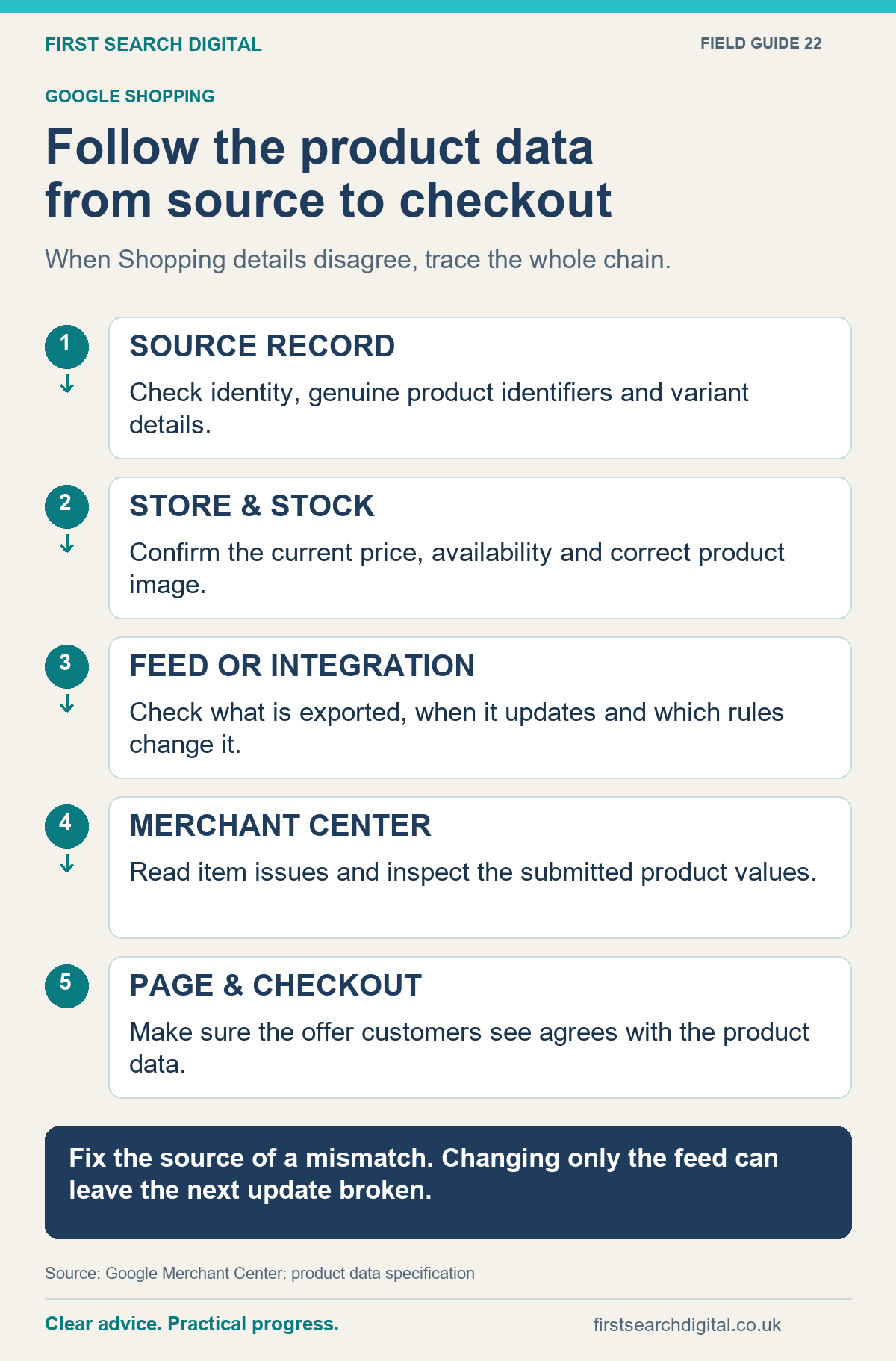
Text version of the infographic: Follow the product data from source to checkout
Follow the product data from source to checkout
When Shopping details disagree, trace the whole chain.
SOURCE RECORD — Check identity, genuine product identifiers and variant details.
STORE & STOCK — Confirm the current price, availability and correct product image.
FEED OR INTEGRATION — Check what is exported, when it updates and which rules change it.
MERCHANT CENTER — Read item issues and inspect the submitted product values.
PAGE & CHECKOUT — Make sure the offer customers see agrees with the product data.
Fix the source of a mismatch. Changing only the feed can leave the next update broken.
Sources: Google Merchant Center: product data specification.
Fix, check and then expand
After correcting the sample, allow the relevant systems to process the update and inspect the result. Check both Merchant Center’s feedback and the customer journey. Do not assume an upload completing successfully means every product is eligible or every detail is right.
Then extend the same method to other products with the same underlying issue. Keep a short change log and retain the previous source data so mistakes can be traced and corrected.
Judge the work through relevant measures: fewer unresolved data issues, more accurate listings, clearer customer expectations and useful sales or enquiries. Cleaner data does not guarantee profitable advertising; pricing, demand, margins and the website still matter.
If you would like help connecting the catalogue, website and marketing, explore my ecommerce consultancy. We can agree a focused cleanup within the available budget, then decide whether wider feed or advertising work is worthwhile.
Put this into practice
Alongside the product-feed checks above, use the Website Launch Checklist to organise the wider website checks before a shop launch or major change. It does not validate Merchant Center feeds or guarantee product approval.